




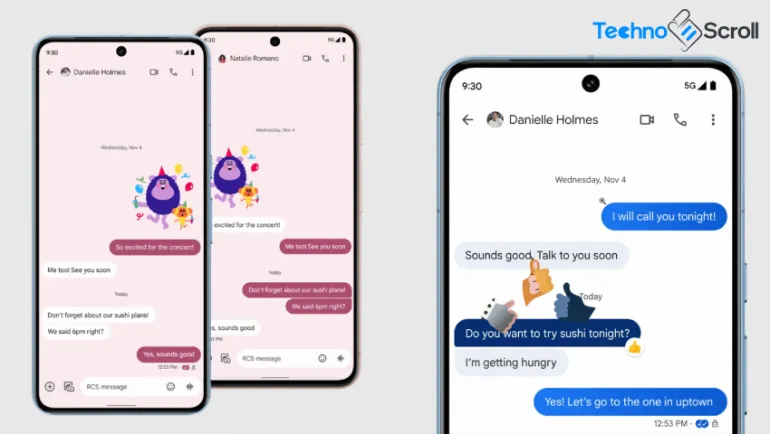
For years, one of the small but beloved perks of owning a Galaxy phone was the ability to personalize your text conversations, custom chat bubble colors, photo backgrounds, and themed wallpapers that made every conversation feel a little more like your own. That feature briefly disappeared as Samsung transitioned away from its own messaging app. Now, Galaxy Messages is getting personal again, with new Chat Themes rolling out that bring familiar customization options back to Galaxy users, this time built directly into Google Messages.
Why Galaxy Messages Needed a Personalization Comeback
Samsung officially discontinued its standalone Samsung Messages app on Galaxy devices running Android 12 or newer, starting July 6, 2026. The company has been directing users toward Google Messages as the new default, primarily to ensure full, consistent support for RCS (Rich Communication Services), including high-quality media sharing, typing indicators, and read receipts. Samsung Messages is no longer available to download from the Galaxy Store, and it can't be installed at all on newer devices like the Galaxy S26 series.
The transition made sense from a technical standpoint, but it left a real gap for longtime Galaxy users. Samsung Messages had long offered deep personalization tools, letting people set custom images from their gallery as chat backgrounds, and go even further using the Theme Park module in Samsung's Good Lock app to adjust bubble colors and contrast. Losing that customization was one of the most common complaints from Galaxy owners as the shutdown approached, with many long-time users voicing frustration in Samsung's own community forums.
Introducing Chat Themes in Galaxy Messages
Responding to that gap, Google has rolled out a new feature called Chat Themes inside Google Messages, specifically designed to restore the kind of personalization Galaxy users were used to. The feature began appearing in beta builds in late June 2026 and has been rolling out gradually since, replacing the older, more limited "Change colors" option.
What Chat Themes Actually Offers
Once enabled, Chat Themes lets you customize each conversation individually with two main tools:
Color palettes: Choose from a range of color schemes for message bubbles and chat backgrounds.
Wallpaper backgrounds: Pick from curated theme categories, including Cityscape, Art, Landscape, Space, Vibes, Textures, and Abstract, or upload your own photo directly from your gallery as a custom chat background.
This mirrors the personalization depth that made Samsung Messages popular, letting each conversation feel visually distinct, whether that's a shared photo with a close friend or a clean, minimal look for a work chat.
How to Personalize Your Galaxy Messages Chats
For users who already have the feature enabled, applying a new theme is straightforward:
- Open any conversation in Google Messages.
- Tap the three-dot menu in the top corner of the chat.
- Select Chat theme (this option has replaced the older "Change colors" menu).
- Choose a preset wallpaper category, or tap Choose a photo to upload your own image.
- Select a bubble color that complements your chosen background.
- Tap Apply to save your changes.
If a theme doesn't look quite right, a Reset to default option is available on the preview screen, making it easy to start over without losing your custom photo selections permanently.
A Personal Touch, Not a Shared One
One important distinction from the old Samsung Messages experience is worth noting: Chat Themes in Google Messages are private by design. When you customize a conversation's background and bubble colors, only you see that change. The person you're messaging will continue to see their own selected theme, or the default appearance if they haven't customized anything. This differs from Google's earlier, simpler theming system, which applied the same look to both participants in a conversation.
This approach gives Galaxy users more individual control over how their own inbox looks and feels, even if it means chat customization is no longer a shared visual experience between both people in a conversation.
What This Means for the Broader Galaxy Messaging Experience
This update matters beyond simple aesthetics. Samsung has increasingly leaned on deeper integration with Google's ecosystem across its software, and Galaxy Messages personalization is a clear example of that shift working in users' favor. Rather than maintaining a separate personalization system, Samsung's messaging experience now inherits ongoing improvements directly from Google Messages, including features like Gemini AI integration, enhanced spam protection, and Messages for Web, all alongside the customization tools longtime Galaxy users specifically asked to keep.
For Galaxy owners who were hesitant to make the switch away from Samsung Messages, Chat Themes closes one of the more noticeable feature gaps, making the transition considerably less disruptive than it initially appeared when the shutdown was first announced.
Rollout Status: What to Expect
As of this writing, Chat Themes is still in a staged rollout. Reports indicate the feature is arriving via server-side updates, meaning it can appear on a device without requiring an app update, but availability remains inconsistent even among users running the same beta build. If you don't see the "Chat theme" option yet when you tap the three-dot menu inside a conversation, your device likely hasn't received the update yet. Keeping Google Messages updated through the Play Store and enabling the Messages beta program can help you access the feature sooner, though a broader, stable rollout to all users is expected in the coming weeks.











Comments
There are no comments for this Article.