




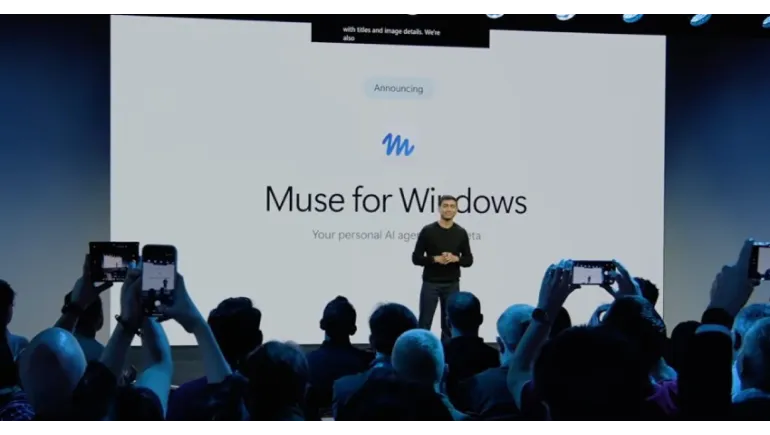
Microsoft says Meta's personal AI agent is coming to Windows as a native app. The news matters more for how Windows will handle AI agents than for the app itself, which hasn't shipped.
On October 7, 2026, Windows and Surface chief Pavan Davuluri announced that Meta Muse is coming to Windows PCs as a native app. He made the announcement at Microsoft's Windows and Surface event in San Francisco. Microsoft said the app is "coming soon," but neither company has given a release date.
This article explains what Muse is, what Microsoft and Meta have confirmed, and what Windows users should do while they wait.
What Is Meta Muse?
Muse is Meta's personal AI agent. Unlike a chatbot that only answers questions, an agent takes action. Meta designed Muse to complete tasks such as booking appointments, filling out forms, and managing email. Meta launched it first in the United States, and it already runs on mobile, on the web at muse.ai, and in a native Mac app released in September. With the user's permission, the Mac app can reach files, messages, calendar, notes, and mail.
What Is Confirmed for Muse on Windows
- Muse is coming to Windows as a native app, according to Microsoft's Windows Experience Blog.
- The app will use "MXC integration," Microsoft's containment technology for AI agents.
- Microsoft calls the move a way to give people "more choice" in the agents they use on a Windows PC.
Just as important is what isn't confirmed. There is no release date, no hardware or Windows version requirement, no Windows pricing, and no list of launch countries. Microsoft also hasn't said how much file and app access the app will request.
Why a Native App Matters
Windows users can already open Muse in a browser. But that web version runs in Meta's cloud-based Muse Secure VM, a secure virtual machine, and it cannot reach files stored on your PC. That is a real limit for people whose work lives in local folders, spreadsheets, and desktop apps.
A native app could close that gap. It could let Muse work with your files and applications directly, the way the Mac version does. That would move Muse from a helpful web tool to a true desktop assistant. Whether the Windows version goes that far remains unconfirmed.
What MXC Means for Security
MXC stands for Microsoft Execution Containers. Microsoft describes it as policy-driven containment for AI agents. In simple terms, it aims to limit what an agent can touch on your PC, so it works inside defined boundaries instead of roaming freely. That matters because an agent that clicks, types, and opens files carries more risk than a chatbot that only talks.
Analysts have noted the tension. A Meta agent with deep Windows access could prove a useful open platform, or a permissions problem if the controls are weak. Microsoft hasn't yet published how MXC will apply to Muse, so judge it only once the details arrive.
How Muse Compares With Other AI Assistants
Windows already has Microsoft's Copilot. Rival agents such as ChatGPT Atlas, Gemini Agent, and Comet run in the browser, so they work on Windows today without a separate download. Muse takes a different path with a dedicated client. Microsoft frames the move as part of an ecosystem where several agents work alongside Copilot. For users, that means more choice, but also more decisions about which agent deserves access to your data.
What to Do Before the Windows App Arrives
- Use the web version for non-file tasks. It works in Chrome or Edge for eligible accounts.
- Avoid unofficial installers. Some third-party apps use the Muse name. One GitHub project, for example, is a community tool for Meta's coding agent, not the official Windows app, and its installer is unsigned. Always check who publishes a download.
- Plan your permissions. When the app ships, grant access to only the folders and accounts the agent needs, and watch for approval prompts before it takes actions.
- Ask your IT team first at work. Company data rules may limit which agents you can use.
Muse on Windows could make AI agents a normal part of the desktop, with real help for email, forms, and routine tasks. But it's still an announcement, not a product. Without a release date, permission details, or pricing, the sensible move is to wait, use the web version for now, and read the security controls carefully when the native app finally arrives.












Comments
There are no comments for this Article.