


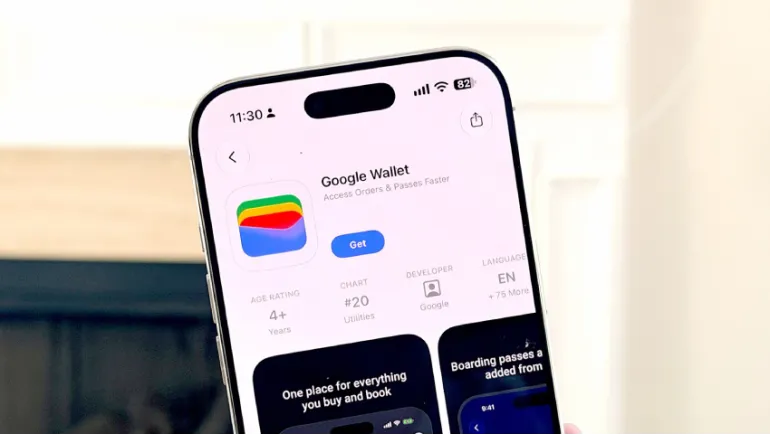
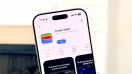
Google launched the Google Wallet app on iPhone in the U.S. It is free, requires iOS 17 or later, and syncs with Gmail to organize boarding passes, tickets, loyalty cards, and orders. It does not support tap to pay, so Apple Pay still handles in-store payments.
Google and Apple rarely build apps for each other's phones. This launch is a surprise. This guide explains what Google Wallet on iPhone does, what it lacks, and who should download it.
What Is Google Wallet for iPhone?
Google Wallet is a digital wallet app. It stores your passes, cards, and receipts in one place. Until now, it ran only on Android and the desktop. Google Vice President P.J. Linarducci shared the iOS rollout in an official announcement. The app is now available in Apple's App Store.
Your items are attached to your Google Account. You can reach them on iOS, Android, and desktop.
Google Wallet iOS Launch: Key Facts
- Release date: November 17, 2026
- Availability: U.S. only, with no announced plan for other countries
- Price: Free
- Requirements: iPhone with iOS 17.0 or later (not iPad)
- Size: About 171MB
What Can Google Wallet Do on iPhone?
Gmail synchronization
The app syncs with Gmail and other Google apps. It can pull in digital boarding passes, event tickets, receipts, and package tracking without manual entry. Reports describe this connection as opt-in, so you choose what it imports.
Loyalty cards and memberships
You can scan a physical card with your camera and add it to the app. This works for loyalty cards and gym memberships. You can then leave the plastic at home.
Online payment management
The app lets you manage payment methods for online checkout. It also shows order confirmations, receipts, and delivery updates in one list.
A hub for agentic commerce
Google calls Wallet a secure hub for agentic commerce. That term means AI tools that complete shopping tasks for you. Google recently let U.S. users connect Wallet to its Gemini app. Engadget calls this the one area where Google's app could differ clearly from Apple's. These AI shopping features are still early, so expect them to grow.
Does Google Wallet Support Tap to Pay on iPhone?
No. Google says tap to pay is not supported on iOS at this time. The App Store listing says the same. Apple limits contactless payments on iPhone to Apple Pay. Google has not said whether this will change.
Reports also say the iOS app lacks digital driver's licenses, transit terminal tapping, and Apple Watch support. People who search for Google Pay on iPhone should know that in-store tapping is not part of this launch.
Google Wallet vs Apple Wallet
| Feature | Google Wallet on iPhone | Apple Wallet |
|---|---|---|
| Tap to pay | No | Yes |
| Boarding passes and tickets | Yes | Yes |
| Loyalty cards | Yes (camera scan) | Yes |
| Gmail sync | Yes | No |
| Order and package tracking | Yes | Limited |
| AI purchase tools | Yes, via Google tools | Not offered |
| Works across Android and desktop | Yes | No |
Apple Wallet remains the better in-store option on an iPhone. Google Wallet works better as an organizer for people who live in Gmail.
Who Should Download Google Wallet on iPhone?
Download it if you
- Use both an Android phone and an iPhone
- Receive most tickets, receipts, and travel emails in Gmail
- Want order tracking in one place
- Plan to try Google's AI shopping tools
Skip it if you
- Use iCloud or another email service
- Need contactless payments, IDs, or transit passes
- Live outside the U.S.
Privacy: What to Check Before You Sign In
The app reads data from your Google apps. Review what it imports during setup. You can limit Gmail access if you feel uneasy. Google's privacy settings control what it keeps. I have not tested the app myself, so check Google's support pages before you decide.
How to Set It Up
- Open the App Store on an iPhone running iOS 17 or later.
- Search for "Google Wallet" and tap Get.
- Sign in with your Google Account.
- Choose which Gmail items the app can import.
- Scan any loyalty cards you want to add.
Google Wallet on iPhone is useful but limited. It organizes passes, receipts, and orders well, especially if you rely on Gmail. It cannot replace Apple Wallet for payments. Download it if you want a smarter organizer, and keep Apple Wallet for the register.
Frequently Asked Questions
Is Google Wallet available on iPhone?
Yes, but only in the U.S. at launch.
Can I pay in stores with Google Wallet on iPhone?
No. Use Apple Pay for in-store tap-to-pay.
Is Google Wallet free on iOS?
Yes. It is a free download.
Does it replace Apple Wallet?
No. It works as a companion app, not a replacement.








Comments
There are no comments for this Article.