


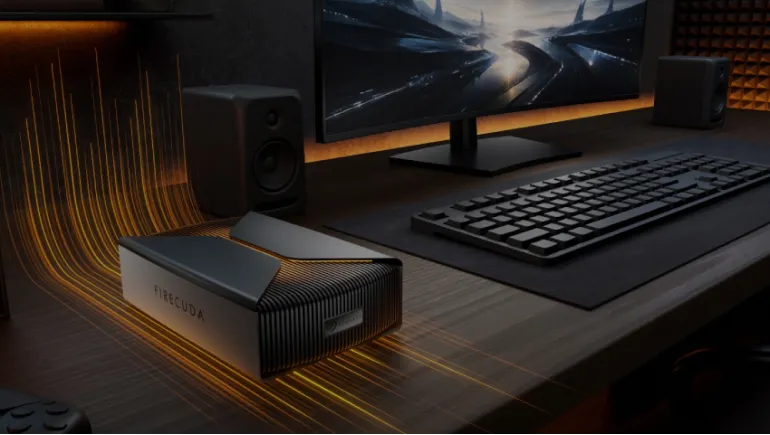
The Seagate FireCuda Forge is a desktop external drive with an 8TB or 20TB hard drive and a slot for your own NVMe SSD. Seagate's Alkemi technology uses the SSD as a fast tier, so the pair acts as one volume with speeds up to 2,500MB/s. The drive starts at $699 for 8TB and $899 for 20TB, and the SSD costs extra.
What Is the Seagate FireCuda Forge?
The FireCuda Forge is an external drive that merges two storage types. A 3.5-inch hard drive provides the space. An SSD that you install provides the speed. Your computer sees only one drive.
It is the first product built on Seagate's Alkemi platform. The drive connects over USB4 and works with Thunderbolt 3, 4, and 5 ports. It is a desktop unit, not a pocket drive.
How Does Seagate Alkemi Technology Work?
Alkemi is dynamic tiering software. It watches which files you use often and keeps them on the SSD. It leaves less-used files on the hard drive. When you copy data in, the SSD absorbs the transfer first, so writes finish quickly.
The SSD works as a cache and adds no capacity. A 20TB model gives you 20TB, not 21TB. Unlike old hybrid drives, the Forge ships with no flash installed, so you supply the SSD.
Seagate FireCuda Forge Features and Specifications
The table below lists the main specifications from Seagate and TechRadar's review.
| Spec | FireCuda Forge |
|---|---|
| Capacities | 8TB or 20TB (3.5-inch HDD, replaceable) |
| SSD slot | M.2 2280 NVMe, PCIe Gen 3 or newer (not included) |
| Official SSD limit | Up to 1TB |
| Interface | USB4 (works with Thunderbolt 3, 4, and 5) |
| Top speeds | 2,500MB/s read, 2,000MB/s write |
| Power | External AC adapter (not bus-powered) |
| Size and weight | 240.3 × 146.8 × 65.2mm; 1.845kg (8TB), 1.919kg (20TB) |
| Operating systems | Windows 11, macOS 26 or later |
Seagate asks for an SSD rated at least 2,400MB/s read and 2,000MB/s write. It also recommends one with a DRAM cache. The drive arrives formatted for Windows, so Mac users must reformat it.
Seagate FireCuda Forge Read and Write Speeds
TechRadar tested the 20TB model and measured about 2,250MB/s read and 1,730MB/s write in CrystalDiskMark. An ordinary external hard drive manages about 200MB/s. In one real-world test, copying just over 1TB of camera data took about 12 minutes, versus about 80 minutes on a standard hard drive.
Speed drops when you push past the SSD's size. TechRadar saw a slowdown while copying 4TB. It was still faster than a plain hard drive. Files that have not been used recently also load more slowly at first.
Seagate FireCuda Forge Price: What You Really Pay
Seagate lists $699 for the 8TB model and $899 for the 20TB model. Those prices exclude the SSD, and the drive does not work until you install one. Budget for a 1TB NVMe drive on top. Prices vary by market, and Seagate says availability differs by region.
The 1TB SSD is a small fraction of the 20TB drive, about 5%. For the 8TB model, it is 12.5%. Both models need an SSD, so the 8TB version gives you a larger fast tier relative to its size.
FireCuda Forge vs External SSD vs Traditional External HDD
Each drive type fits a different buyer. The table below compares them on the points that matter most.
| Factor | FireCuda Forge | External SSD | Traditional external HDD |
|---|---|---|---|
| Capacity | Up to 20TB | Costs more at high capacity | Up to 20TB or more |
| Speed | Up to 2,500MB/s on cached data | Fast across all data | About 200MB/s |
| Setup | You install the SSD | Plug and play | Plug and play |
| Power | Wall adapter | Usually bus-powered | Varies |
| Cost | Higher, plus SSD | High per terabyte | Lowest per terabyte |
TechRadar noted that Seagate's own 20TB Expansion desktop drive costs about £300. The Forge costs more, but it moves data much faster.
Is FireCuda Forge Good for Gaming and Video Editing?
Gaming
It can store a Steam library. In testing, games took longer to load than from an internal SSD. Once loaded, they ran well. It suits offloading games when your internal drive is full.
Video Editing
Editing from the drive felt close to an SSD for projects near 1TB. A 4TB Premiere Pro project opened fast and edited smoothly. Switching between large projects can bring a brief slowdown. It is also strong for fast backups after a shoot.
Who Should Buy the FireCuda Forge?
- Buy it if you offload large files often and want near-SSD transfers with huge capacity.
- Buy it if you edit small to mid-sized video projects from a desktop.
- Skip it if you want the cheapest storage per terabyte. A plain hard drive costs far less.
- Skip it if you need maximum speed on all your data. An external SSD stays fast everywhere.
- Skip it if you need a portable, bus-powered drive.
How to Upgrade FireCuda Forge Storage
Both the hard drive and the SSD are replaceable. Remove four hex screws on the base, then lift the cover. Seagate includes a hex key, but you need your own cross-head screwdriver for the SSD screw. Stick on the provided thermal pads, insert the SSD, and close the cover.
Frequently Asked Questions
What is Seagate FireCuda Forge?
It is a desktop external drive with an 8TB or 20TB hard drive and a slot for your own NVMe SSD. The two work together as one volume.
How does Seagate Alkemi technology work?
Alkemi tracks your file use and keeps frequently used files on the SSD. It leaves the rest on the hard drive. You see one drive and never move files by hand.
Does FireCuda Forge come with an SSD?
No. You must buy and install an M.2 2280 NVMe SSD. The drive does not work until you do.
What storage capacities does FireCuda Forge offer?
It comes in 8TB and 20TB. The hard drive is replaceable, so you can swap it later.
What is the maximum read and write speed?
Seagate rates it at up to 2,500MB/s read and 2,000MB/s write over USB4. Real results vary. TechRadar measured about 2,250MB/s read and 1,730MB/s write.
Which NVMe SSD works with FireCuda Forge?
Use an M.2 2280 PCIe Gen 3 or newer drive rated at least 2,400MB/s read and 2,000MB/s write. Seagate recommends DRAM cache and officially supports up to 1TB.
Is FireCuda Forge suitable for gaming?
Yes, for storing games. Load times were slower than an internal SSD in testing, but play was smooth afterward.
Can FireCuda Forge handle 4K video editing?
It handled a 4TB Premiere Pro project well in TechRadar's test. Performance is best when active files fit in the SSD. Switching between large projects can cause short slowdowns.
Does the NVMe SSD increase the total storage capacity?
No. The SSD works as a cache. Total capacity equals the hard drive's size.
Which operating systems support FireCuda Forge?
Seagate lists Windows 11 and macOS 26 or later. The drive ships formatted for Windows, so Mac users must reformat it.












Comments
There are no comments for this Article.