




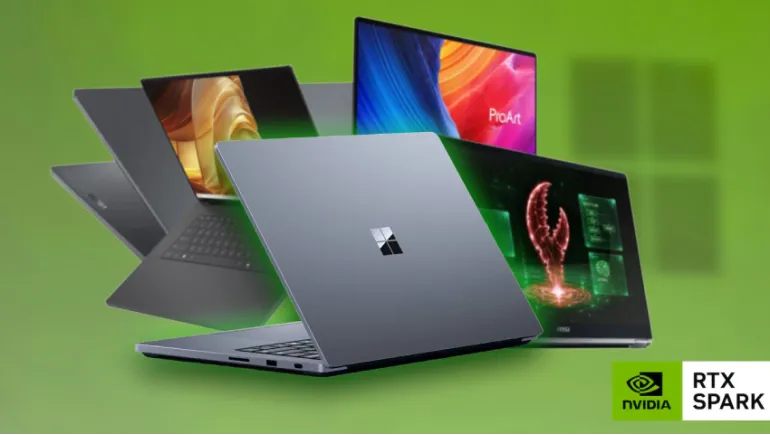
Six brands now sell laptops built on the same NVIDIA chip. Because the processor is identical, the real choice comes down to memory, display, cooling, battery, and price.
NVIDIA's RTX Spark platform reached stores on October 16, 2026, with laptops from ASUS, Dell, HP, Lenovo, Microsoft, and MSI. Prices start at $2,599, and the most expensive configuration reaches $6,999.99. This guide compares the main models, explains what the chip does well and poorly, and helps you choose.
What Is NVIDIA RTX Spark?
RTX Spark is a single Arm-based chip, called the N1X. It combines an NVIDIA CPU with a Blackwell GPU and shares up to 128GB of memory between them. It comes in two versions: an 18-core CPU with 5,120 GPU cores, and a 20-core CPU with 6,144 GPU cores. NVIDIA claims about 1 petaflop of AI performance, and the chip supports CUDA, which many AI tools need.
These laptops run Windows 11 on Arm. Most apps work well, but compatibility is still a real consideration, and we cover it below.
The Laptops at a Glance
- Microsoft Surface Laptop Ultra: 15-inch mini-LED screen, from $2,599, 24GB memory
- ASUS ProArt P14: 14-inch, from $2,599.99, 24GB memory and 512GB storage
- ASUS ProArt P16: 16-inch OLED, from $2,799.99, with 64GB and 128GB options that cost much more
- HP OmniBook X 14 and OmniBook Ultra 16: From $2,999.99 and $3,199.99, with 3K OLED screens
- Lenovo Yoga Pro 9n: 16-inch convertible, from about $3,100, 32GB and 1TB
- MSI Prestige N16 Flip AI+: 16-inch convertible with a Tandem OLED screen, from $3,299.99
- Dell XPS 16: 3.2K OLED, from $3,799.99, the highest starting price
Prices differ between retailers, and several outlets list slightly different figures for the same model, so confirm before you buy.
How the Brands Differ
ASUS: The Creator and Power Pick
The ProArt P16 is the most capable option. It's thinner and lighter than the Surface despite a larger screen, uses an OLED display, and has a 99.9Wh battery. Reviewers call it exceptional for people who can use its power and excessive for everyone else. It runs cooler than the Surface, with surface temperatures around 105°F compared with 123°F, but its fans get louder, near 50dB. The 14-inch P14 is the cheapest and lightest way into the platform.
Microsoft: Quiet and Well Rounded
The Surface Laptop Ultra matches the ASUS on price at the low end. It runs quieter, with fans staying near 42dB, and it offers a better webcam, faster SSDs, and magnetic USB-C charging. The tradeoff is its mini-LED display, which falls behind the ProArt's OLED in key areas, and a battery that lasted 9 hours in one video test.
Dell: Premium Design, Premium Price
The XPS 16 is the first XPS with RTX Spark. It has a thin chassis and a 3.2K OLED panel. At $3,799.99, it costs the most to start, so it suits buyers who value the XPS look and feel.
HP: Lower Prices, but Watch the Memory
HP undercuts Dell and MSI on starting price. However, reviewers warn that the 32GB configuration limits local AI work. If you plan to run AI models, pick a higher memory tier.
Lenovo and MSI: The Convertibles
The Yoga Pro 9n and the Prestige N16 Flip AI+ fold into tablets. MSI's model is described as the first RTX Spark 2-in-1. Choose one of these if you want touch and pen use.
Performance, Battery, and Gaming
Performance is similar across brands. In graphics tests, the ProArt P16, Surface Laptop Ultra, and HP OmniBook Ultra 16 score within a few percent of each other. The differences come from cooling and memory, not the chip.
Battery life is good, not great. The ProArt P16 lasted about 12 hours in a video test and nearly 11 in an app test, while the Surface managed about 9 hours in the video test and just over 10 hours of web browsing in another. One analysis notes that the Surface's battery is 27% larger than a MacBook Pro 14's for the same runtime.
Against Apple, tests show a split. The MacBook Pro leads in CPU work and battery life, while RTX Spark's GPU wins some graphics and AI tests. Gaming is a weak spot. Reviewers advise against buying an RTX Spark laptop mainly for games, and reports say popular anti-cheat titles such as Call of Duty and PUBG won't arrive until 2027. NVIDIA's own regional team says RTX Spark won't replace gaming PCs.
Why Memory Matters for Local AI
Unified memory is the real divider. Larger AI models need more of it. Entry models with 24GB or 32GB handle light work, while 64GB and 128GB configurations run bigger models but cost thousands more. If local AI is your goal, buy the most memory you can afford, because you can't upgrade it later.
Windows on Arm: What to Check
Microsoft's Prism emulator runs most non-native apps well. But some older software, niche professional tools, and legacy games still run into problems. Before you buy, check that the apps you rely on work on Windows on Arm.
Which RTX Spark Laptop Should You Buy?
- Best for creators and heavy AI work: ASUS ProArt P16 with 64GB or more
- Best entry price and quiet use: Microsoft Surface Laptop Ultra or ASUS ProArt P14
- Best 2-in-1: Lenovo Yoga Pro 9n or MSI Prestige N16 Flip AI+
- Best premium design: Dell XPS 16
- Best value with higher memory: HP OmniBook Ultra 16, configured with more than 32GB
- Mainly for gaming: Skip RTX Spark and buy a traditional RTX gaming laptop.
RTX Spark laptops are powerful, expensive, and best for creators and people who run AI locally. Because the chip is the same, choose on memory, display, noise, and price. Check app compatibility first, and wait if gaming is your main goal.








Comments
There are no comments for this Article.