




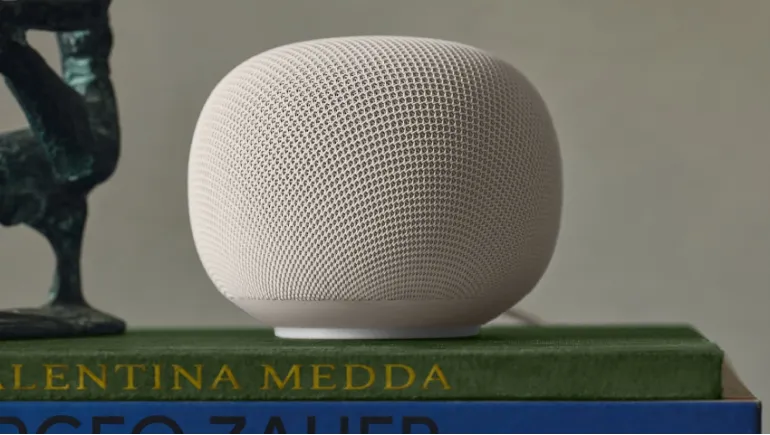
Some Google Home speakers have quietly downloaded hundreds of gigabytes of data. Google says a fix is rolling out, but the cause is still unexplained.
A bug in some Google Home speakers is eating home internet data. Owners began reporting the problem in mid-October 2026, and tech publications confirmed it by measuring their own devices. Google has said a fix is on the way. The incident shows how little most people know about what their smart speakers do on the network.
This guide covers what happened, what causes it, how to check your own speaker, and what to do next.
What Is Happening?
Affected speakers download large amounts of data in the background, even when no one uses them. Reports include:
- A Reddit user who saw 3.3TB downloaded in one month
- A speaker that repeatedly downloaded a firmware file of about 460MB every 20 minutes, adding up to roughly 35GB a day
- A reporter's unused speaker that used 17GB in 24 hours and 41GB on one day
- One speaker that tried to download 140GB overnight
Amounts vary widely. One speaker used just 2GB in a month, while another in a different home used 132GB.
What Is Causing the Google Home Data Bug?
Google hasn't explained the cause. Observers suspect a failed firmware update. The downloads come from Google's servers, and the pattern suggests the speaker keeps trying to fetch an update but never installs it. Smart speakers normally download firmware automatically in the background, and a typical update measures from several hundred megabytes up to about 2GB. A loop would repeat that download again and again.
Google also hasn't said which firmware versions carry the fault. Reports point mostly to the new 2026 Google Home Speaker, but nobody knows how widespread the issue is.
Has Google Fixed It?
Google has acknowledged the problem and says a firmware fix is rolling out. However, rollouts take time, and one owner reported that Google's replacement unit fell into the same download loop. Since Google hasn't named a fixed version, you can't yet confirm a repair by firmware number alone. Watch your usage instead.
How to Check Your Speaker's Data Usage
The bug only shows up in network statistics, so you must look for it.
- In the Google Home app, open the Wifi tab, then Devices, and select your speaker. Look at the Device usage graphs, which show 1, 7, and 30 days.
- Alternatively, open your router's admin page and check per-device data usage.
Compare the numbers with other devices. A quiet speaker should use very little data between updates.
What to Do If Your Speaker Is Affected
- Record the evidence: Save screenshots, the firmware version, and the dates of the spikes.
- Contact Google support: Share that information with your device model.
- Avoid a quick factory reset: It may not fix a server-side or firmware loop.
- If you have a data cap: Consider unplugging the speaker or blocking its Wi-Fi access in your router until Google's fix installs. This is a precaution, not an official instruction.
Is This a Privacy Problem?
The reports describe a software bug, not a data leak. Most of the traffic is incoming data from Google, which fits a firmware loop. Still, Google hasn't explained the cause, so keeping an eye on your router is sensible. Other brands have had similar issues. Amazon confirmed that a bug in some Echo Show devices cached large images and used gigabytes of data, and it fixed the problem. Bugs like this happen across the industry.
Should You Buy a Google Home Speaker Now?
The bug shouldn't scare you off forever, but timing matters. If you have a limited data plan or a provider with a soft cap, wait for confirmation that the fix works. If your plan is unlimited, the main risk is wasted bandwidth. Whichever speaker you buy, check its data usage in the first week and set router alerts if available.
This bug is a reminder that smart home devices use your network all the time. Check your speaker's usage today, and make a habit of reviewing it after major updates. If you spot a spike, document it and contact support.










Comments
There are no comments for this Article.