




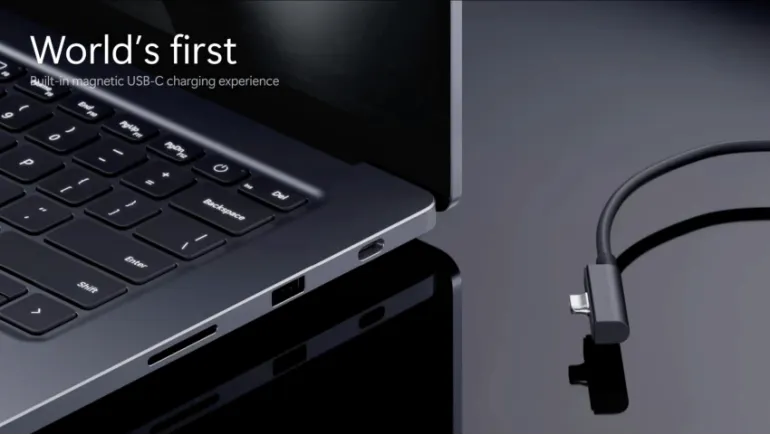
Laptop makers have long forced a choice: a magnetic cable that breaks away safely, or a universal USB-C port. Microsoft says its new Magnetic Connect system delivers both.
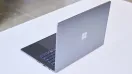
The Microsoft Surface Laptop Ultra arrived this week with a surprise that has nothing to do with its chip. Microsoft built a magnetic charging system called Magnetic Connect into the laptop's standard USB-C port. The Surface Laptop Ultra starts at $2,599 and ships on October 16, 2026.
This article explains how Magnetic Connect works, how it differs from Surface Connect and Apple's MagSafe, and what to check before you buy.
What Is Magnetic Connect?
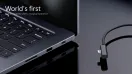
Magnetic Connect is a charging cable that attaches by magnet to the right-side USB-C port on the Surface Laptop Ultra. Microsoft calls it the "world's first built-in magnetic USB-C charging experience." That's Microsoft's own claim, but it holds up better than most "world first" labels, because the laptop's port itself is a standard USB-C port rather than a proprietary connector.
The box includes a 140W magnetic USB-C cable. If someone trips over the cord, it releases from the laptop instead of dragging the machine off the desk.
How Magnetic Connect Works in Practice
- Charging: The magnetic cable snaps onto the right-side USB-C port and delivers up to 140W.
- Other uses: The same port still handles video, data, and other USB-C devices when the magnetic cable isn't attached.
- Standard chargers: All three USB-C ports accept ordinary USB-C chargers. Only the right-side port works with the magnetic cable.
- Power brick: Tom's Guide reports the included 140W charger is small and light, and it uses a magnetic USB-C connection at its end too.
The laptop also has HDMI, USB-A, an SD card reader, and a headphone jack. It has no Surface Connect port.
Surface Connect vs USB-C: What Changed?
Surface Connect was Microsoft's own magnetic charging port. It worked well, but it only fit Surface chargers and took up space that could have gone to a useful port. One report notes Microsoft already dropped Surface Connect from the 12-inch Surface Pro and 13-inch Surface Laptop last year.
Magnetic Connect keeps the convenience and removes the dedicated port. Any USB-C device works in that socket, and the laptop gains room for one more flexible connection. The tradeoff is that the magnetic cable itself is still Microsoft's own accessory, so you can't snap a third-party cable into place with the same grip.
Magnetic Connect vs Apple MagSafe
Apple's MagSafe also breaks away safely, but it uses a proprietary connector on the laptop. Magnetic Connect uses a normal USB-C port, which makes it more flexible. Tom's Guide's hands-on test found the cable snaps away cleanly when pulled, much like MagSafe, with no drag on the roughly 4.5-pound aluminum body.
Not every reviewer is as excited. PC Gamer pointed out that the feature doesn't ease the sting of a $2,599 price. It's a thoughtful addition, but not a reason to buy the laptop on its own.
Limits and Trade-Offs to Know
Magnetic Connect has real constraints. Only one of the three USB-C ports supports the magnetic cable, so you can't pick a different side of the laptop. One report also says the cable is wide because of the hardware inside it, and it could block neighboring ports depending on the laptop's layout. The cable also stays proprietary, so losing it means buying a replacement from Microsoft.
Some coverage also suggests recent EU rules requiring USB-C charging on new devices may have influenced the design. That's speculation, and Microsoft hasn't said so.
Will Other Surface Laptops Get Magnetic Connect?
Microsoft hasn't said. For now, Magnetic Connect appears only on the Surface Laptop Ultra. Coverage notes that future Surface models could adopt it, since it helps Surface stand out among Windows PCs, but that's an expectation, not a confirmed plan. If you're buying a different Surface today, check its charging port before you order.
Should Magnetic Connect Influence Your Purchase?
It's a nice quality-of-life feature, especially if you've missed breakaway charging or work in shared spaces. But the bigger buying questions are the RTX Spark chip, Windows on Arm app compatibility, and the price. Treat Magnetic Connect as a bonus. If you travel often, check that the cable's width doesn't crowd the ports you use most, and consider a spare cable.
Magnetic Connect solves an old laptop problem in a clever, practical way. It brings MagSafe-style safety to a standard USB-C port, and it ends the need for a separate Surface Connect socket. It isn't perfect, since the cable is proprietary and only one port supports it, but it's a smart design choice that other Windows laptops may soon copy.






Comments
There are no comments for this Article.