




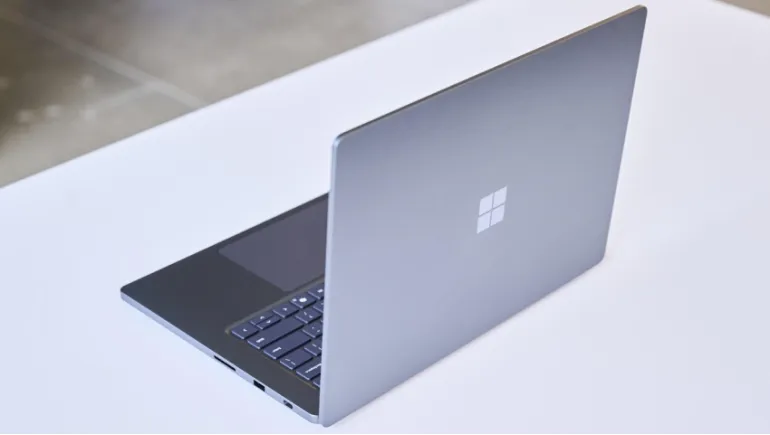
Microsoft stopped experimenting with odd hinges and detachable screens. The Surface Laptop Ultra is a straightforward, powerful 15-inch laptop built to go after Apple's best.
Microsoft has tried to win over power users before, with mixed results. Its latest attempt is the Surface Laptop Ultra, a 15-inch laptop built around NVIDIA's new RTX Spark chip. Microsoft revealed the full details this week, priced it at $2,599, and opened preorders, with availability starting October 16.
Andrew Hill, Microsoft's corporate vice president of Surface, called it the most powerful thing the company has ever made. Here is how Microsoft engineered it, and what buyers should know before choosing it over a MacBook Pro.
A Chip Built Around Unified Memory
The core of the Surface Laptop Ultra is the NVIDIA RTX Spark N1X, a single chip that combines an Arm-based CPU, a Blackwell GPU, and a shared pool of memory. The chip comes in two versions: one with an 18-core CPU and 5,120 GPU cores, and a larger one with a 20-core CPU and 6,144 GPU cores. NVIDIA says the platform delivers up to 1 petaflop of AI performance and graphics power comparable to a laptop RTX 5070.
The key design choice is unified memory. The CPU and GPU draw from the same pool, which reaches up to 128GB in some configurations. That approach mirrors Apple's own chips, and it matters most for running large AI models locally, since big models need big memory. The base configuration starts at 24GB.
Cooling That Shaped the Whole Design
A powerful chip makes heat, and Microsoft built the chassis around that fact. The company says the laptop has 2.5 times the thermal headroom of the Surface Laptop 7 15-inch, and it uses the largest fans Microsoft has ever put in a Surface. The result is a thicker, heavier machine, but hands-on reviewers described it as sturdy and similar in feel to a 16-inch MacBook Pro. It weighs under 4.5 pounds and comes in black or dark silver.
Surface Laptop Ultra Design and Features
Microsoft kept the rest of the package familiar to premium laptop buyers.
- Display: A 15-inch mini-LED panel that reaches 2,000 nits of peak brightness in HDR mode
- Charging: A magnetic USB-C charger that works much like Apple's MagSafe
- Ports: Multiple USB-C ports, HDMI, and a full-size SD card slot
- Touchpad: A large haptic touchpad that reviewers found smooth and responsive
Surface Laptop Ultra vs MacBook Pro: Price and Performance
At $2,599, the Surface Laptop Ultra costs about $400 less than the base 16-inch MacBook Pro. Microsoft also claims it responds about twice as fast as the MacBook Pro M5 when running AI models locally, and generates video about six times faster. Treat those numbers carefully. They are Microsoft's own claims, and independent testing is only beginning to arrive.
NVIDIA's CUDA software also runs natively on the chip. Many AI tools are built for CUDA, so developers can use familiar frameworks on a thin Windows laptop. Apple's Macs do not support CUDA. Adobe is also reworking Premiere Pro and Photoshop to take advantage of RTX Spark, and early demos showed faster rendering.
The Catch: Windows on Arm
The RTX Spark chip uses an Arm CPU, so the laptop runs Windows 11 on Arm. Most popular apps now run natively, and Windows' Prism emulator handles many older x86 programs well. But compatibility is still the main risk, especially for niche professional software, some older games, and developer tools such as Android emulation. Battery life is another open question, since independent testing hasn't confirmed Microsoft's claims about holding full performance unplugged.
Who Should Buy the Surface Laptop Ultra?
This laptop targets AI developers, 3D artists, and video editors who want a Windows machine with serious local AI power. It also suits anyone who wants a MacBook Pro-class laptop without leaving Windows. If you depend on a specific app that doesn't run well on Arm, check compatibility first. If you mainly browse, write, and stream, this is more machine than you need, and a cheaper laptop will serve you well.









Comments
There are no comments for this Article.