




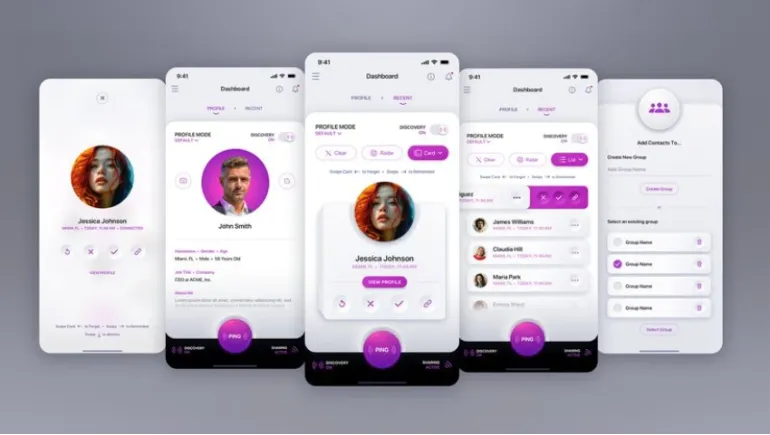
Mobile app design in 2025 has evolved to meet higher expectations for speed, personalization, accessibility, and intuitive navigation. With users spending more time on mobile than ever, designers must balance innovation with usability. This year, successful app design is defined by human-centered thinking, adaptive interfaces, and seamless cross-platform experiences. Below are the key guidelines and trends shaping mobile app design in 2025.
User-Centered Design Remains Core
The foundation of any good app is a deep understanding of the user. In 2025, user-centered design (UCD) is not just recommended—it’s expected. Every design decision should address user pain points, behaviors, and motivations.
- Conduct regular user testing with diverse demographics.
- Use behavior data to inform design updates.
- Prioritize features that align with user intent.
Adaptive and Responsive Design for Foldables and Wearables
With more users owning foldable phones, tablets, and wearable devices, apps must adapt fluidly across screen sizes and orientations. Responsive design now extends beyond just portrait and landscape modes.
- Create flexible grid systems and scalable UI components.
- Use breakpoints for foldable screens.
- Consider companion interfaces for smartwatches and fitness bands.
Touchless Interaction and Voice UI Integration
Apps are becoming more accessible with touchless interactions. Voice UI, gesture controls, and AI assistants are reshaping the way users navigate apps, especially in productivity, health, and home automation categories.
- Include voice command options using native APIs like SiriKit and Google Assistant.
- Keep voice interactions short and clear.
- Design fallback touch options for all interactions.
Minimalist UI with Maximal Functionality
Minimalism continues to be dominant, but now it’s about achieving more with less. Clean interfaces with powerful functionality keep users focused and reduce cognitive load.
- Flat design with bold typography.
- Clear visual hierarchy and intuitive iconography.
- Contextual actions based on user flow.
Accessibility First: Inclusive Design Principles
Accessibility is no longer an afterthought. With global regulations tightening and public awareness increasing, inclusive design is a must.
- High-contrast text and scalable font sizes.
- Voice-over support and screen reader compatibility.
- Haptic feedback for interaction cues.
- Motion reduction options for sensitive users.
Microinteractions and Animation for User Feedback
Microinteractions guide users through processes and provide instant feedback. In 2025, subtle, purposeful animations enhance the user experience without slowing it down.
- Progress indicators, loading bars, and swipe confirmations.
- Visual feedback on tap and drag gestures.
- Smooth transitions between app screens.
Dark Mode and Theme Personalization
Users expect more control over their interface experience. Dark mode, light mode, and dynamic themes are now standard in design systems.
- Use system-level theme detection (iOS/Android).
- Ensure all UI elements are legible in both themes.
- Provide a manual toggle for user preference.
Context-Aware Personalization
AI-driven personalization is more intelligent in 2025. Context-aware apps adjust content, UI, and layout based on time, location, and usage patterns.
- Adaptive home screens showing relevant features.
- Predictive search and navigation shortcuts.
- Localized content and language options.
Zero State and Empty State Design
First impressions matter. When an app is first opened or when content is missing, users should still feel guided, not lost.
- Use illustrations, onboarding tips, and CTAs in zero states.
- Explain why an empty state exists and what to do next.
- Avoid leaving screens blank—every screen should teach or guide.
Cross-Platform Consistency (iOS, Android, Web)
Users expect seamless experiences across devices. Whether it's an Android tablet, iPhone, or a progressive web app, the experience should be consistent and intuitive.
- Follow platform-specific guidelines while maintaining brand identity.
- Share core UI components across versions.
- Use frameworks that support cross-platform development like Flutter or React Native.
Security and Privacy by Design
With more scrutiny on data privacy, design choices must reinforce security without adding friction.
- Use biometric authentication and encrypted tokens.
- Design clear, simple privacy settings.
- Educate users visually on data usage.
Speed Optimization: Design for 5G and Offline Use
Thanks to 5G, users expect near-instant loading times. Still, offline functionality is key for global audiences.
- Optimize image and video file sizes.
- Implement skeleton screens for loading states.
- Cache critical features for offline access.
Gesture Navigation and One-Handed Use
App navigation in 2025 favors gestures over buttons. Designs must be usable with one hand, particularly on large-screen devices.
- Keep primary controls within thumb reach.
- Use swipe gestures for actions like delete, reply, and archive.
- Avoid hidden gestures—always teach them with tooltips.
Sustainable and Ethical Design
Digital well-being and sustainability now influence design choices. Responsible designers build apps that respect time, attention, and the environment.
- Avoid dark UX patterns (e.g., deceptive CTAs).
- Include features that encourage breaks or usage limits.
- Optimize for battery life and device performance.
Final Thoughts
In 2025, mobile app design is about crafting experiences that are smart, inclusive, and responsive to the evolving needs of users and technology. Following these guidelines not only ensures a better user experience but also sets the foundation for long-term engagement and brand loyalty. Whether you're designing a new app or updating an existing one, these principles will help you stay relevant, efficient, and ahead of the curve in today’s competitive mobile landscape.












Comments
There are no comments for this Article.